
Welcome back to Part II of REST Integration Design. We will review a method to combine Scripted REST and Import Set Row/Transform Maps together into a powerful ServiceNow Integration model. In this example, we will be using a middleware tool to POST data sets from our internal sources of truth out to ServiceNow. We will examine the Scripted REST tools in ServiceNow in coordination with the Import Set Rows and Transform Maps to make a nice one way data integration API.
Download this integration template update set here for free!
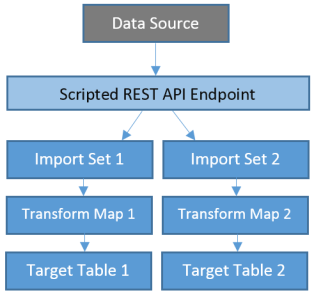
You can learn more about what those terms mean and why we are doing it this back in Part I of our article. But to summarize, this is why am I using Scripted REST on-top of Import Set Rows:
- Transform Maps and Import Set Rows Rock: Powerful and easy to troubleshoot
- Scripted REST allows us to create custom end points, parameters and error code handling
- Scripted REST allows us to manipulate message and field names out of the message
- Scripted REST can allow us to flatten JSON nodes easily
We will strip the fields and data out of the message then add the profile to the user table followed by adding the multi-locations table. My specific requirements for this particular job are laid out in a little more detail below
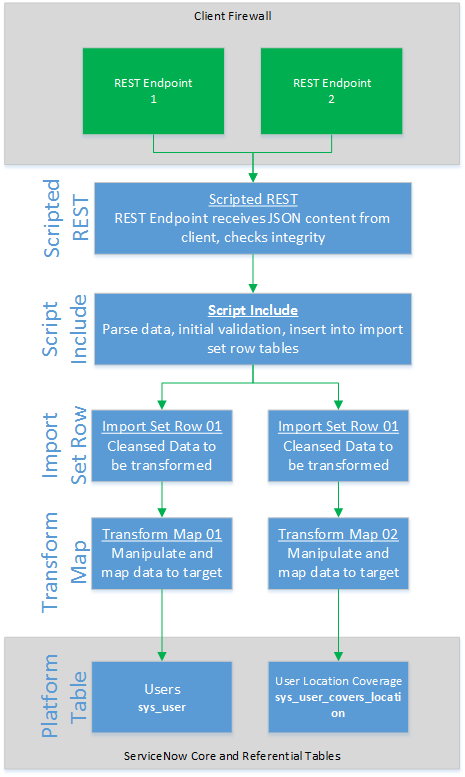
Step 1. Let’s look at the message being sent to ServiceNow
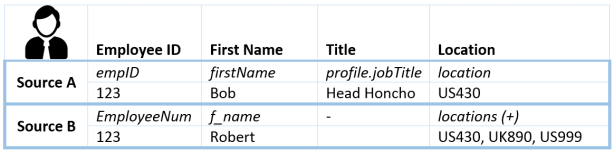
In my world, I have two similar data sources each with their own field names. Using this design however, I can keep one import set row table and one transform rule set for user profile data, having the Scripted REST act as a wrapper. Another advantage is that we could receive both of these sets in a single POST message.
Example: Two data sets for a single given user profile
I recommend the website https://jsonformatter.curiousconcept.com/ to validate good JSON and to format it for viewability. You can download my sample JSON here and paste it on that website now to see it.
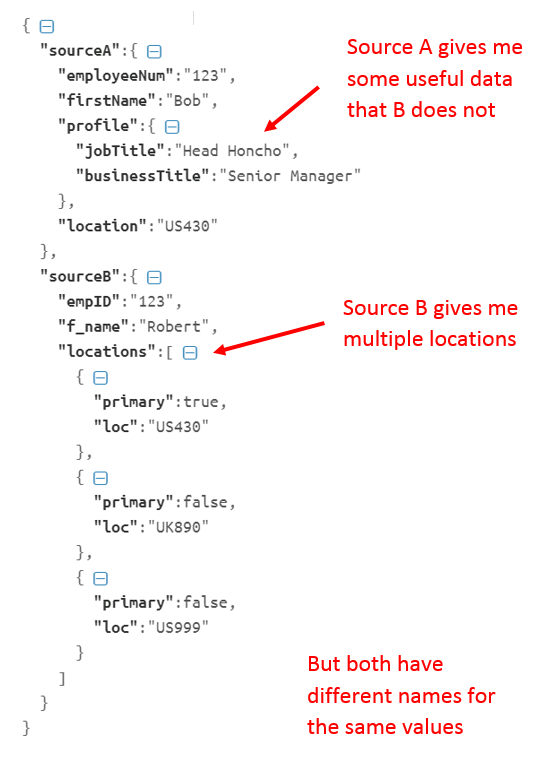
To summarize once more, my challenges were the following:
- Sources have mostly similar data but different names for the fields
- Source A or Source B may be provided individually or together in one payload
- Each souce has some amount of useful data unique to its data set
- Sources provide desired data within child nodes
Now, you might be asking: Shouldn’t one message have all the right content normalized instead? Yep that’s a great point, but not always our reality. This method however helps us make it more manageable.
Step 2. Scripted REST API provides a URL endpoint
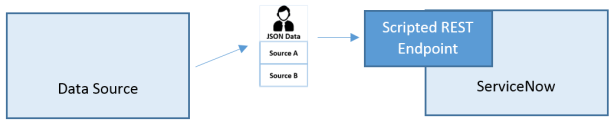
Creating a new endpoint will provide a URL for the source system to POST data to. After setting up a new record here and enabling versioning, we create a resource in the related list named user with HTTP method POST. This means data sets sent to this URL will be processed here and we will use that to pull apart the data and drop it into an Import Set Row.
Learn more about Scripted REST API from the ServiceNow Docs.
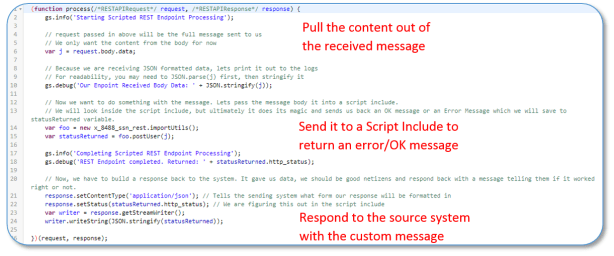
Step 3. The Script Include will pull apart the data and place it neatly into the appropriate Import Set Rows
Now that we have our hands on that data, lets do some work with it in a Script Include.
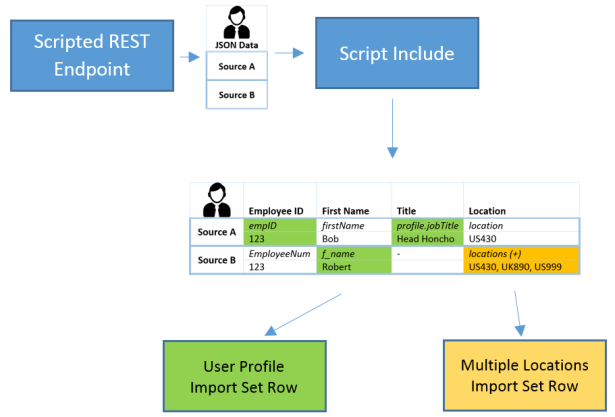
Let’s quickly review what we will do in the Script Include
- Lets make sure the data is good first. We can return custom crafted errors that are meaningful and useful to the source sending us these messages.
- Pull the data fields out and plug them into the import set row, no matter what the field is named.
- Step through JSON data with multiple level of nodes and either press it down into one level or even put it into a completely different import set row table.
The end result is to manipulate the received data and push it into a simpler import set row. From there, we can use ServiceNow’s useful Import Set Row/Transform Functionality to take advantage of the useful features in that mechanism.
Learn more about Import Set Rows from the ServiceNow Docs.
Let’s step through the Script Include now (not shared yet) and review some of the key components.
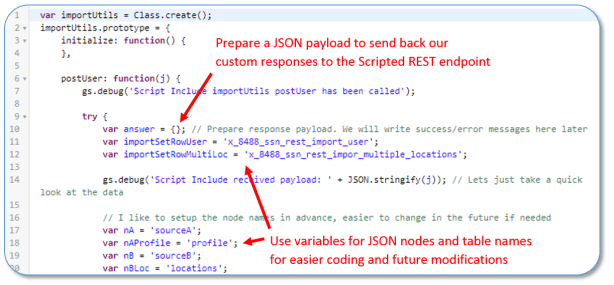
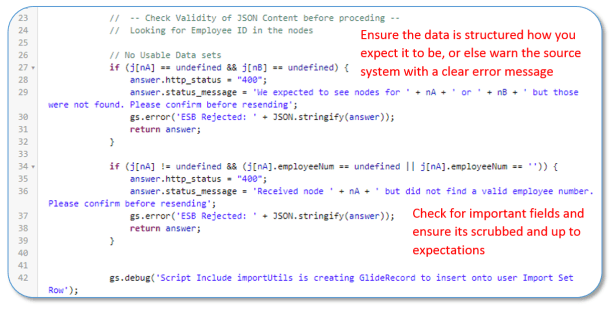
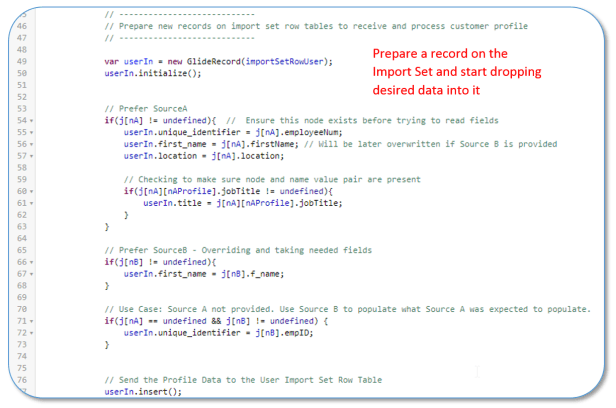

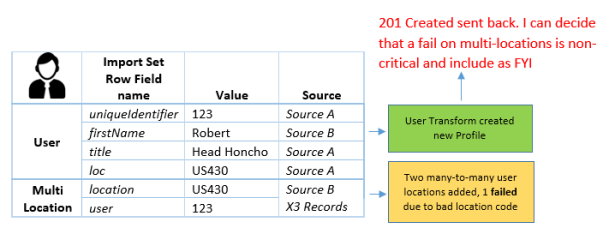
Just for the sake of time, I did not include the insert of the import set for multi locations. But, the power of this system would allow me to treat a bad insert/update on sys_user table as a serious error in the response yet somewhat disregard errors on the multi-location import, telling the source we accepted the profile as a 201/200 OK, but also FYI informing them of non-critical issue on the multi-location import. Huge ability here to customize and craft error message for an enterprise level integration.
Conclusion
We can combine the Scripted REST functionality along side the Import Set Row/Transform functionality native to ServiceNow to build powerful and flexible APIs to import data. Scripted REST allows us to flatten JSON nodes, manipulate field names and manage data values prior to placing the data into the Import Set Rows. We can then harness the exiting power of Import Set Rows and transforms. Finally, we can craft useful and custom HTTP Responses for enterprise.
 Service Starts Now
That post was amazingly useful for me, thank you very much for that, the main structure works like a charm 😉
LikeLike
Thanks really glad it helped out!
LikeLike
Toney, Nice content. I was thinking of an incident inbound using the same approach, but if I write to the import set table using scripted Rest, do we get the sys_id/Incident number for the incident number created after the transform which I can use in the scripted Rest response?
LikeLike
Yep after the transform you get the sysid of the import set row. A glide query in my included script example gets the sysid and display of the target record (incident in this case) and passes it back to the response payload
LikeLike
Thanks, I will take a look.
LikeLike