
One of my favorite parts of my job is sitting with a stakeholder and asking “What questions do you want this product to answer?”. The resulting on the fly report writing, tweaking in real time and the excitement they get when they realize the amount of value they can get out of 15 minutes always re-energizes my excitement in the tool. The problem is.. how do we scale this value add to more users? We sure can’t sit with all of them.
Now, you might want to jump in and say “Well, I’ve written plenty of great dynamic dashboards for support teams using the Assignment Group dynamic filter”..

You’re totally right, we write plenty of dynamic assignment group reports for our IT support folk, but there is an unserved population who get value instead from reporting on a CI/Business Service/Service Offering. This article will show an easy way to make a dynamic filter on CI.
Who would need this?
While there isn’t a specific title or role, I am sure you’ve interacted with these types of users, in my experience they may have some of the following attributes:
- Likely does not belong to any relevant assignment groups and may not even be a Fulfiller
- IT Support may only know their names because the are vocal on behalf of users during major incidents, prodding IT for updates and priority
- May by involved with development teams or related project management
- Corporate employees interested in specific or range of platforms.
For these users, we find ourselves back to hardcoded assignment group reports or hardcoding reports on a group of CIs. Interestingly, I find once you report on CI you find tickets you never would have found with assignment group reporting.
Example: 4 Tickets all for the same CI
INC01 was closed by the first technician because he had a useful KB article to refer to.
INC02 was routed to the wrong group and closed arbitrarily by that annoying Product Z team who just reply “wrong team, not us” and close the ticket.
INC03 and INC04 were escalated to the right specialist team and closed as expected.
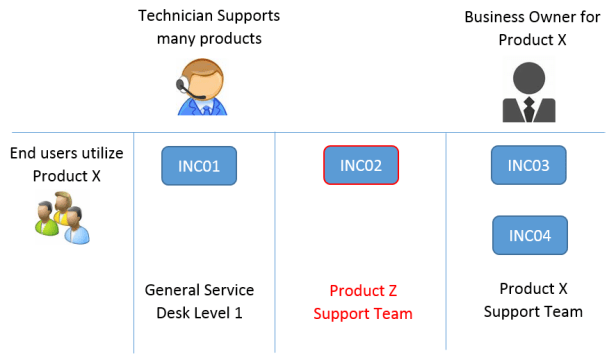
You can see CI reporting may open unexpected escalation paths. So, lets see how we can shift to reporting on CI’s dynamically for users similar to dynamic assignment groups.
The Solution
For my usecase, I am using Business Services as my CI focus. Using the out-of-box Subscribe UI Action on Business Service Related Links, we will let the users browse the list of Business Services and say “I am interested in X, Y and Z”.
Pressing this button calls a Script include that writes a simple record to sys_notif_subscription.


Note that there are some out of box functions here such as notifications that fire off to users who are subscribed. I’ve disabled those in our instance, maybe you want to proceed with using them or adding new events.
Next, we will add a Dynamic that calls a Script Include, looks up the user’s subscribed CIs and uses that for our dynamic report.
Create a new Script Include:
Name: getMySubscribedServices
Client Callable = true
Download this code here.
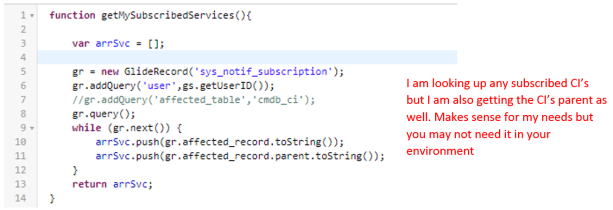
Next we will navigate to System Definition > Dynamic Filter Options – Create New.

And there we go, now when we write a new report such as “My Subscribed CI active Incidents”

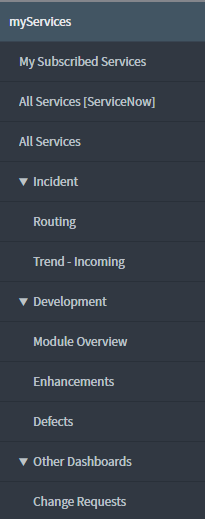
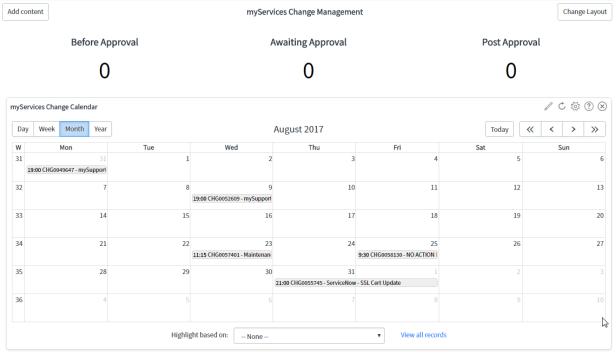
Take it to the next level by building out entire Dashboards based on reports with this functionality. A screenshot of my effort at this is currently in-progress, but the idea is look at the list of services they can subscribe to. Below are a couple screenshots of a report or two using this functionality.
Module Menu
Change Request
Incident Trends – Incoming by Hour

Conclusion
Reporting by CI is a great approach for a particular group of users.
- Making a dynamic filter for subscribed CI’s allows dynamic dashboard writing where assignment group may not be the best approach, potentially because they don’t belong to the groups.
- Allowing the users to subscribe on their own frees the administrative overhead of having to associate groups to the CMDB
- Dynamic Dashboard collections let any user realize the value of effort you might have put together for just one specific team.
 Service Starts Now