
Greetings all,
In some outbound REST calls, basic auth may not be sufficient. I’ve had a few requirements where a seperate request must first be made to get an auth token, and wanted to share the solution I wrote.
Our example today is CloudBolt, and though the specifics may not apply same way everytime, the concept is universal. I’ve seen this in a number of other services as well.
Let’s review what we will accomplish today
- Create an auth POST to obtain a token
- Pass that token into a GET/POST to be utilized
- Create a Script Include so that we can seemlessly execute this two-step process anywhere in the platform
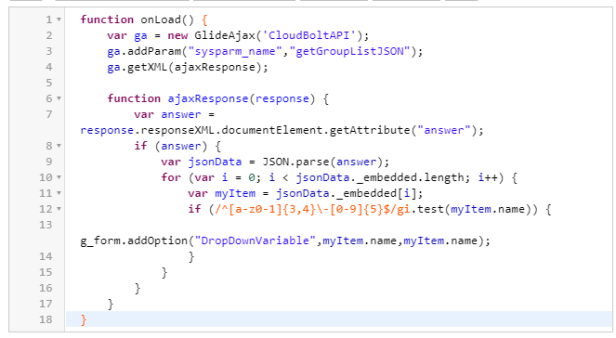
- Call the GET API on client script during a catalog order form with AJAX to populate a dropdown list dynamically
Outbound REST Message I: Auth
I want to ask CloudBolt to do something like spin up a server. For me to make that API call, I first must perform a seperate API call all together to get an Auth Token.
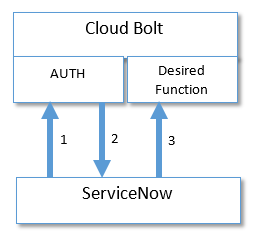
Let’s navigate to System Web Services > Outbound > REST Message within ServiceNow and get started.
Create a new REST Message called CloudBolt. Provide in the HTTP Request Headers:
Accept : application/json
X-CSRFToken : Provided by your CloudBolt admin (if directed)
Your CloudBolt admin will also provide a basic Auth username/password. Don’t put it here yet.
Now in the related list below, create a new HTTP Method: [Endpoint may vary, consult your CloudBolt admin]
Name = Auth
HTTP Method = POST
Endpoint = https://cloudmanager.[YourCompany]/api/v2/api-token-auth
Authentication Type = Basic
Content = {“username”:”USERNAME“,”password”:”PASSWORD“}
Save it and hit Test, you should get back a Response (Fake example)
{"token":"eyJhFeef34DFG9ydEBpaGcuY29tIiwiZXhwIjoxNTI0MTcwNjMwfQ.tetMp3jjXlbRRPCCF6zacspxfdDwRA4hrbvDWsogqe4"}
That token should be good for a bit so copy to notepad.
Outbound REST Message II: Desired Function
In this example, I am going to GET a list of groups from CloudBolt to later populate into a Catalog Item Dropdown list.
Using same REST Message for CloudBolt, I will create a second HTTP Method:
Name = CBL-Groups
HTTP Method = GET
Endpoint = https://cloudmanager.[YourCompany]/api/v2/groups/?page_size=1000
HTTP Request Headers :
Accept : application/json
Content-Type : application/json
Authorization : Bearer ${token}
Create new Variable Substituation with:
Name = token
Test value = paste the long Token string obtained prior
The key here is that a variable with be used where we pass the token
This way, we can dynamically insert new tokens on the fly. Hit Test and watch the magic happen! I hope.. Maybe pull that Auth token again.
Tie them together in a Script Include
To chain these two APIs together, we will build a new Script Include
In our use case, we will call this from Client Script so first:
Name = CloudBoltAPI
Client callable = True
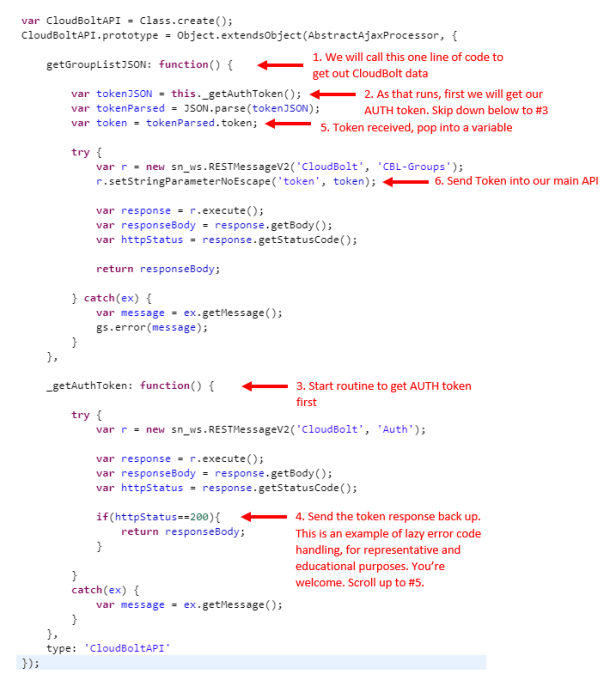
Using AJAX to pull multi-step API
I’ll be calling both APIs with one Ajax call on a Catalog based Client Side Script. My goal is to get the list of groups from CloudBolt and populate a dropdown list.
Conclusion
Wether you came here for multi-step auth API how-to or Client Side AJAX API call, I hope this was clear and helpful. If you have any questions, feel free to comment and share!
 Service Starts Now
Do you notice a long lag time between your request and response when using this method? I have been working to do verification of catalog item variables through glideajax callsto a rest api and it is taking 30+ seconds for them to be processed (the rest calls are going through a midserver as these calls are behind the company firewall)?
LikeLike
Hi Derrick, no we saw very short times, I’ve not done rest through the midserver there is a polling period that might play a part.
Help me understand, SN is making a REST post from the midserver to an inhouse data store? Is SN instance on premise?
LikeLike